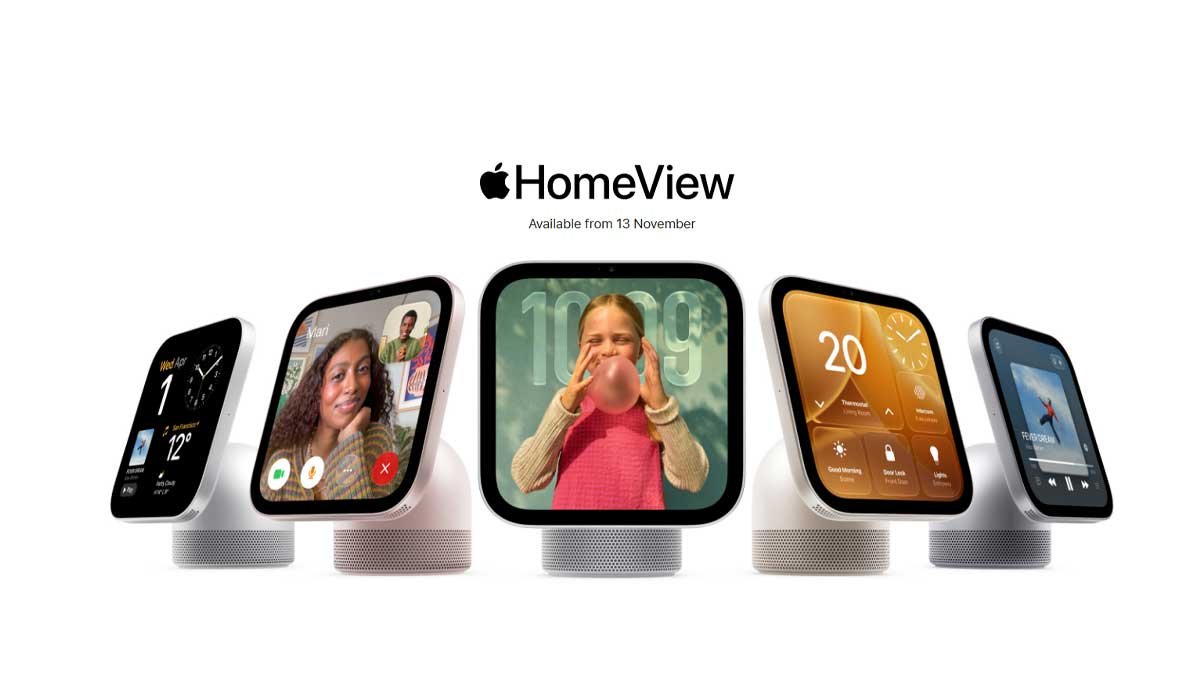
HomeView features a 7-inch Liquid Retina display connected to a speaker base through a stainless-steel hinge. The screen can tilt to provide a more comfortable viewing angle when placed on different surfaces.
Its aluminium design comes in four colours: silver, starlight, rose pink and space grey. The display includes True Tone technology and automatic brightness adjustments to help it remain visible in changing lighting conditions.
Apple says the screen can reduce its brightness significantly at night, making it more suitable for a bedside table. Its interface can also adapt to the user’s distance, displaying simpler information when viewed from across the room and more detail when someone approaches.
For households that prefer wall-mounted technology, the separate wall-mounted model offers the same display and core features in silver and space grey.
These design choices suggest that Apple wants HomeView to become part of the home environment rather than another screen that is used only occasionally.
Siri AI Brings More Personalised Assistance
One of HomeView’s central features is Siri AI, a redesigned version of Apple’s voice assistant powered by Apple Intelligence.
Apple says the assistant is designed to support more natural conversations, answer a broad range of questions and provide greater awareness of information displayed on the screen.
When paired with a compatible Apple Intelligence-enabled iPhone or iPad, Siri AI can also use relevant personal context from supported apps, including Calendar and Messages, to provide more useful responses.
For example, a user might ask about an upcoming appointment, look for information from a message or request help finding relevant information. The exact features available will depend on device compatibility, settings, language and regional support.
HomeView also supports conversations that can continue across compatible Apple devices through the Siri app and iCloud syncing.
This could be useful for busy households where people move between rooms and devices throughout the day. However, users should check which functions require a compatible iPhone or iPad before deciding whether the product meets their needs.
Personalised for Different Family Members
A shared smart display can create a privacy challenge when several people use the same device. HomeView attempts to address this by recognising up to six users and adapting its home screen accordingly.
Each recognised user can have their own apps and widgets, while shared photographs and music can remain available for everyone to enjoy.
This approach may appeal to families who want one central device without mixing personal reminders, messages and calendars.
HomeView also includes customisable display faces. Users can turn the screen into a digital photo frame, show useful information at a glance or choose animated designs, including Snoopy.
For families living far from relatives, shared photo albums could offer a simple way to keep memories visible around the home. The display could also provide a central place for household information without requiring each family member to check a separate phone.
Entertainment and Audio in One Place
HomeView is designed to provide more than basic smart-speaker functionality. Its audio system includes two full-range drivers, a downward-firing woofer and passive radiators, with computational audio intended to adjust sound performance automatically.
Apple says the device supports Apple Music, Apple Podcasts, Apple News, Apple TV and compatible third-party audio and video applications, subject to regional and service restrictions.
Its Handoff feature allows users to transfer music playback from a compatible iPhone by bringing the phone near the display. Multiple HomeView devices, HomePod speakers, HomePod mini units and compatible AirPlay speakers can also be used for multiroom audio.
However, buyers should examine app compatibility carefully. Not every service has native support on the device, and some applications may require a nearby compatible iPhone or an eligible subscription. Apple TV and certain other services may require AirPlay from an iPhone rather than working directly on HomeView.
This distinction matters because a smart display’s entertainment value depends on which services people actually use.
FaceTime, Messages and Helpful Kitchen Features
HomeView is also designed to keep household members connected. FaceTime, supported by Centre Stage, can help keep participants in the frame as they move during a call.
Users can read and respond to Messages using their voice or the on-screen keyboard. Apple’s Intercom feature can broadcast announcements to supported devices around the home, including compatible HomePod speakers and personal Apple devices.
In the kitchen, HomeView can display recipes as step-by-step instructions, help track ingredients and control timers hands-free.
These features could be useful when preparing meals, following a recipe or coordinating activities between family members. Rather than repeatedly picking up a phone with messy hands, users can interact with the display using supported voice controls.
The Find My integration can also help users locate compatible Apple devices and supported personal items, while Live Activities can show useful updates such as active timers and incoming Intercom messages.
Smart-Home Control and Monitoring
HomeView is designed to act as a central dashboard for compatible smart-home accessories.
Using the touchscreen or Siri AI, users can control supported lights, adjust thermostats, lock compatible doors, close blinds and view camera feeds.
Apple says its Home Camera interface can display up to nine video feeds simultaneously. With compatible cameras and an eligible iCloud+ plan, supported security features can identify familiar people, pets, packages and vehicles.
The system can also provide descriptions of supported HomeKit Secure Video recordings and detect sounds from smoke or carbon monoxide alarms, sending alerts to compatible Apple devices.
HomeView works with supported Apple Home and Matter accessories. Apple’s new Home Collection, developed with LG Electronics and Schneider Electric, is intended to expand its smart-home ecosystem with products such as cameras, thermostats and locks.
Compatibility remains important: not every connected device will support every feature, and some monitoring functions require additional hardware or subscriptions.
Privacy and Security: What Should Users Know?
Privacy is particularly important for a device that uses cameras, microphones and personal information in a shared space.
Apple says HomeView uses protected processing environments called Secure Exclaves within its A18 chip to isolate certain camera and microphone data. Personal information from supported apps is shown only under specific recognition and paired-device conditions.
Siri requests can be processed on-device or through Apple’s Private Cloud Compute system. Apple says information processed through Private Cloud Compute is not stored or made accessible to Apple or other parties.
These are important design commitments, but users should still review permissions, household recognition settings, connected accounts and camera access before enabling personal features.
Families may also want to consider where the device is installed and whether its camera and microphone functions are appropriate for that location.
Apple HomeView Price and Availability
Apple announced that HomeView and HomeView (Wall Mounted) would be available to pre-order in New Zealand, India, Australia, Canada, the United Kingdom and the United States from 13 October 2026.
Apple listed the starting price for both models at US$299, with availability scheduled to begin on 13 November 2026 in those markets. Local prices, taxes, mounting accessories and availability may differ.
Siri AI is listed as supporting English in both New Zealand and India, although certain features depend on compatible hardware, software and regional availability.
For prospective buyers, checking Apple’s local online store is the best way to confirm the final price, delivery options and accessory requirements.
What Could Apple HomeView Mean for New Zealand Households?
For technology-conscious households in New Zealand, HomeView represents Apple’s attempt to bring smart-home control, entertainment and personalised digital assistance into a single shared device.
Families already using iPhones, iPads, HomePod speakers and compatible smart-home accessories may find the integrated experience appealing. The kitchen could become a convenient place to check reminders, follow recipes and control lights, while the living room could provide a central point for music, calls and household updates.
Nevertheless, the device may not be necessary for everyone. People who mainly want a speaker, already have a tablet for video calls or use smart-home products from several different ecosystems should compare their options before purchasing.
It is also worth distinguishing Apple’s announced capabilities from real-world performance. Compatibility, the availability of individual services and the usefulness of Siri AI will influence the everyday experience.