Drivers using Android Auto are finally seeing YouTube appear in their cars, but the feature is not exactly what many users were expecting. While YouTube support has arrived, Google is still limiting what drivers can do while behind the wheel.
Instead of offering full video playback on a car’s screen, Android Auto currently only supports basic YouTube audio controls. This means users can listen to videos, podcasts, interviews, or music through YouTube, but they cannot actually watch the video content on the dashboard.
Why YouTube on Android Auto Matters
For years, Android Auto users have wanted direct YouTube integration. Many drivers use YouTube for podcasts, long-form discussions, music mixes, and educational content during road trips.
Google has now started rolling out limited support that allows YouTube to appear inside Android Auto’s media player interface. Users can control playback without touching their phones, making the experience safer and easier while driving.
However, the new feature is more focused on background listening rather than video streaming.
The Catch: You Still Cannot Watch Videos
The biggest limitation is that YouTube videos do not play visually on the car display. Instead, Android Auto only shows simple media controls such as:
- Play
- Pause
- Skip to the next video
- Resume playback
The skip button also works differently. Rather than jumping ahead within the same video, it skips directly to the next video in the queue.
This means drivers hoping to watch YouTube videos on their car’s infotainment system will be disappointed. Google continues to block visual playback in order to reduce distractions and improve road safety.
You Need YouTube Premium for the Feature
There is another important requirement. The Android Auto YouTube experience only works if you have background playback enabled through a paid subscription.
That means users need either YouTube Premium or YouTube Premium Lite to access the feature. Without one of these plans, YouTube cannot continue playing when the phone screen is off or when Android Auto is active.
Because of this, the new feature may not be useful for free YouTube users.
How YouTube Appears in Android Auto
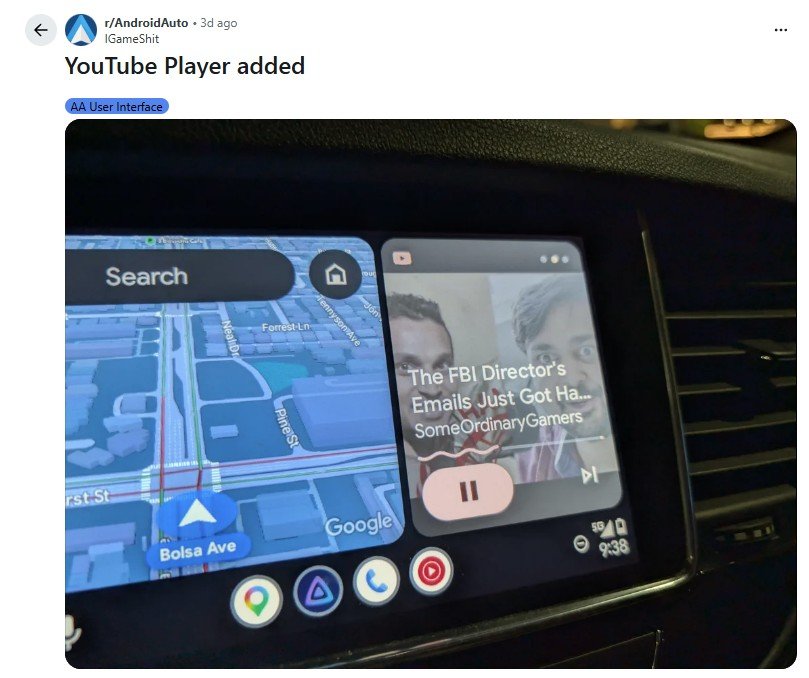
YouTube does not show up as a standalone app icon in Android Auto. Instead, it appears within the media widget alongside other supported audio apps.
Once playback starts on your phone, Android Auto can display:
- The current video title
- Playback controls
- Next-track button
- Steering wheel media support
Drivers can also use their steering wheel buttons to pause or skip content without taking their hands off the wheel.
Why Google Is Limiting YouTube
Google’s restrictions are largely based on safety concerns. Video playback while driving could create major distractions, so the company is only allowing audio-based controls for now.
Android Auto has always limited entertainment apps to music, podcasts, and voice-first experiences. Even users who enable Android Auto developer settings still cannot officially use video streaming apps through the standard interface.
Google appears to be taking a cautious approach by testing audio-only support before expanding the feature in the future.

Could Full YouTube Support Come Later?
There is a possibility that Google may eventually expand YouTube integration, especially when the car is parked. Some newer systems powered by Android Automotive already support more advanced entertainment options in certain vehicles.
Google is also continuing to develop its in-car platform with deeper integration across vehicle software and infotainment systems. That could eventually create room for parked-only video playback or a dedicated YouTube app in the future.

For now, though, Android Auto users will have to settle for listening instead of watching.
Disclaimer: Features for YouTube on Android Auto may vary by device, region, and subscription. Always drive safely and avoid distractions.
Can I watch YouTube videos on Android Auto?
No, Android Auto currently only supports audio playback from YouTube. Drivers can listen to videos, podcasts, and music, but the video itself does not appear on the car’s screen.
Do I need YouTube Premium to use YouTube on Android Auto?
Yes, you need either YouTube Premium or YouTube Premium Lite because the feature relies on background playback, which is only available with a paid subscription.
Where does YouTube appear in Android Auto?
YouTube does not appear as a separate app icon. Instead, it shows up in the Android Auto media player with basic playback controls such as play, pause, and skip.
Will full YouTube video support come to Android Auto in the future?
Google has not confirmed full video support yet. However, there is a chance that parked-only playback could arrive in future updates or in cars using more advanced in-car systems.